Fast can still be wrong
AI made it easier to produce a prototype.
That is useful. I like being able to turn a rough idea into a clickable shape quickly. I like using HTML as a product sketchbook before a direction enters the real app.
But speed exposes a problem.
A prototype can look convincing and still be disconnected from the product. It can miss the user problem. It can ignore the design system. It can make claims the sources do not support. It can create a beautiful screen for the wrong feature.
That is not progress. That is cleanup with nicer shadows.
The point: faster prototyping is only powerful when the prototype carries intent.
The real shift is intent
The Futurice article on spec-driven design names the pressure well: when agents can build quickly, the bottleneck moves toward intent, context, and specification.
I read that through the Design Harness lens. The word "spec" is useful, but for designers it cannot only mean requirements. It has to include product context, user evidence, design taste, source trust, acceptance criteria, and the questions still open.
Otherwise design gets reduced to producing more screens at the same time engineering is learning how to build from clearer intent.
That is the risk. Not that designers disappear overnight. That design becomes the decoration layer after the real decisions have already been written somewhere else.
Reference spark
Futurice: Faster prototypes miss the pointUseful framing for this article, transformed here into a Harness workflow for designers.
The Harness version
The weak loop is familiar:
The stronger loop has more friction at the beginning and less waste at the end.
What the agent needs first
Before asking for a prototype, the Harness should make the agent collect the material that decides whether the prototype is worth making.
| Input | What it protects |
|---|---|
brief.md | The goal, audience, constraint, open question, and human decision point. |
sources.md | The claims the prototype is allowed to make. |
DESIGN.md | Taste, density, tone, banned moves, and product feeling. |
context/design-system/ | Tokens, components, accessibility rules, and layout standards. |
decisions.md | What the team already tried, rejected, approved, or deferred. |
| QA checklist | The proof required before the prototype becomes shareable. |
What the prototype is allowed to do
A Harness-backed prototype is not a mini product.
It is a question made visible.
Test a product decision
Does this flow make sense? Does this hierarchy explain the feature? Does this direction feel like the product?
Expose missing context
If the prototype cannot be written without guessing, that is useful. It means the Harness is missing a source, a rule, or a decision.
Earn implementation
The prototype should not slide into production because it exists. It earns the next step after critique, source checks, and a clear human decision.
The case: ticket to variants, same afternoon
The clearest proof is the redacted Fernwell case study from the generic Design Harness repo.
The starting point was small: a ticket for richer advocate and referral stats. Not a full product rethink. Not a giant discovery phase. A focused design problem with legal constraints, engineering context, and an existing share experience around it.
The Harness treated the ticket as the entry point, gathered the linked world around it, then turned that into usable design constraints before layout work started.
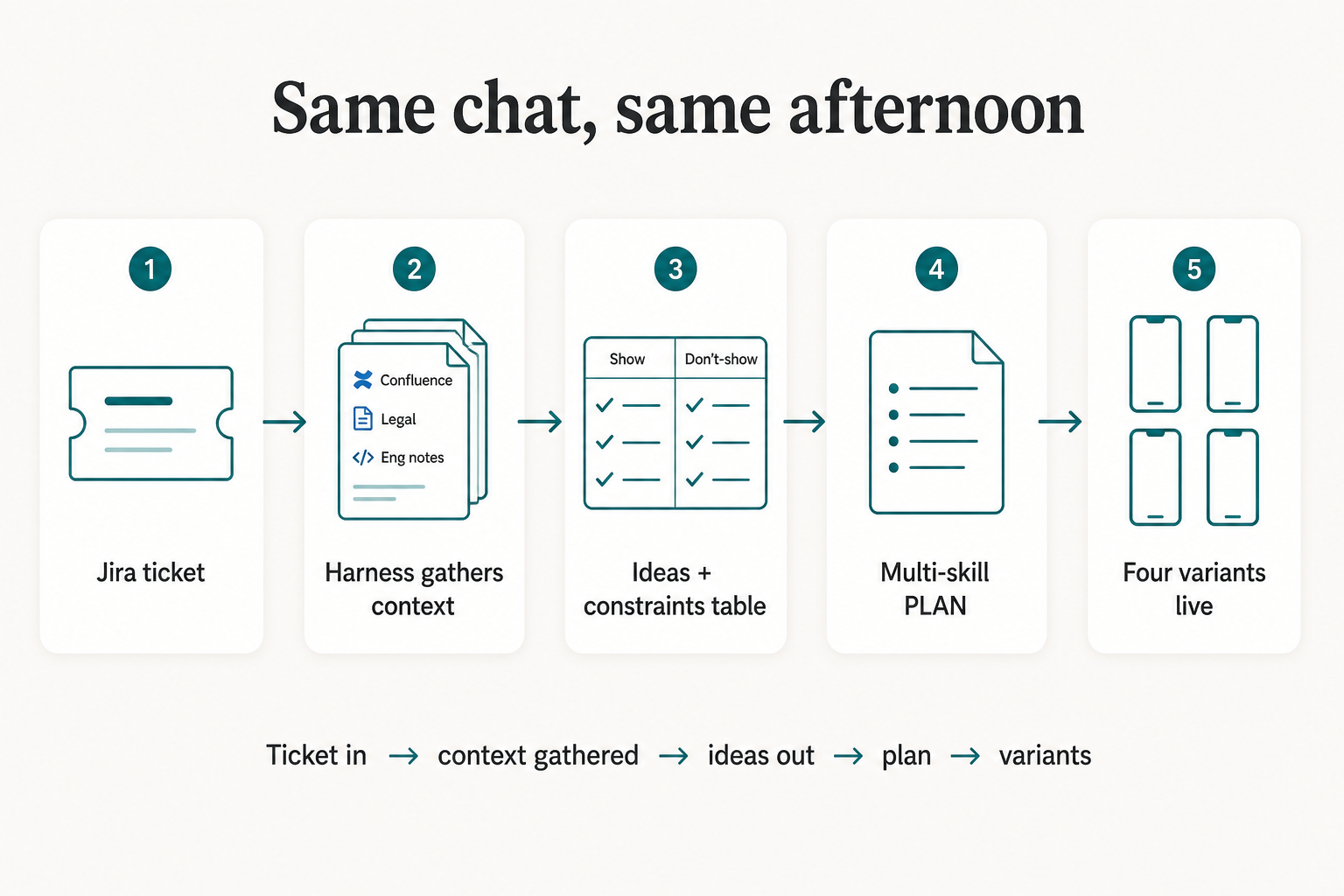
That is the difference I care about. The agent did not start by inventing a pretty stats screen. It first answered: what may the advocate see, what must stay hidden, where does the disclaimer belong, and who owns which piece of the experience?
Constraints before layout
The useful output was not a wall of prose.
It was a show / do-not-show model that made the privacy boundary visible before the UI had a chance to drift.
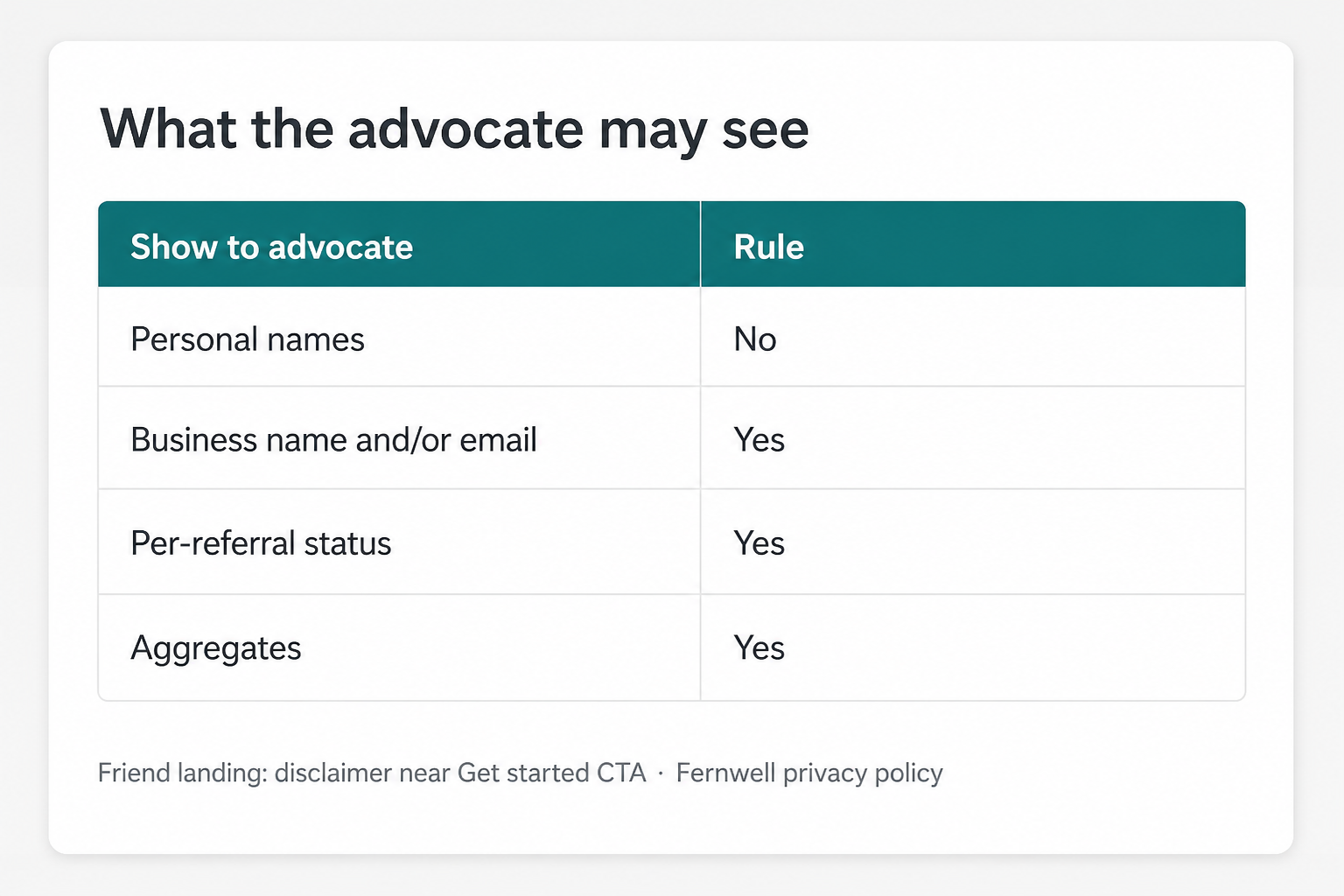
| Design question | Harness answer |
|---|---|
| Can the advocate see personal names? | No. Use business-safe identifiers instead. |
| Can the advocate see referral progress? | Yes, if the status model stays inside the approved boundary. |
| Where does consent show up? | Near the friend entry point, before the user continues. |
| Should a stats outage break sharing? | No. Empty and error states need wrappers so sharing still works. |
This is why context matters. Without it, the agent can make a slick leaderboard that violates the actual product rule.
Variants after the gate
After the constraints were clear, the Harness planned the route: UI skill, design-system context, mobile shell, then audit when the board was ready to share.
Only then did variants make sense.
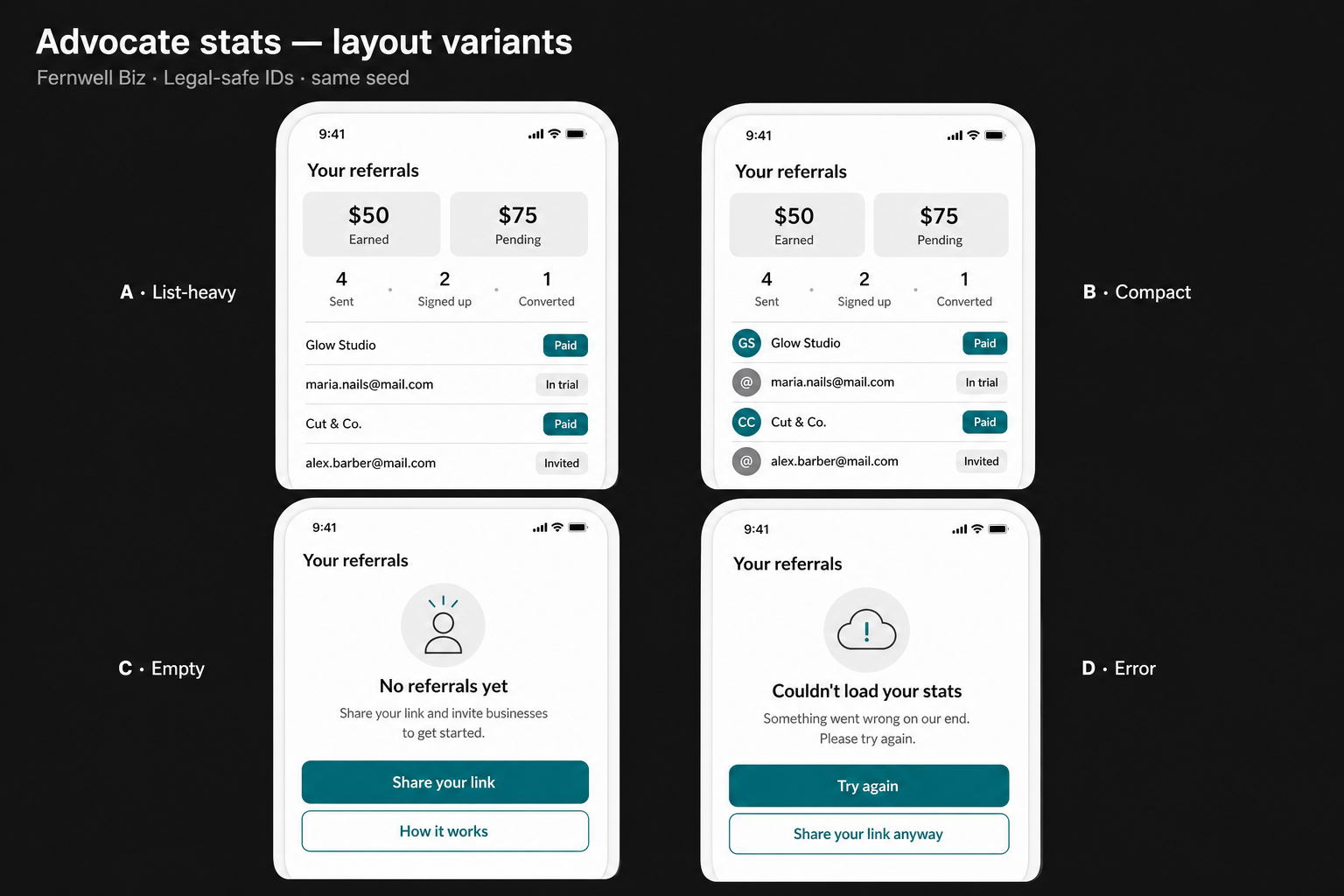
| Variant | What it answered |
|---|---|
| A: list-heavy | Best for detailed status review and engineering alignment. |
| B: compact | Better when the stats live inside a hub or embedded zone. |
| C: empty | Protects the first-use state from feeling broken. |
| D: error | Lets the referral program continue even if stats fail. |
The board was fast because the Harness had already done the slower work: gather context, expose constraints, ask for format, and keep the human gate visible.
Planark proof: the same rule in a product
Planark made this impossible to ignore.
A travel prototype can look beautiful and still waste someone's day. A generated itinerary can read well and still be wrong. A route card can feel premium and still hide weak place identity, bad distance logic, missing coordinates, or invented details.
That is why Planark's useful loop is not "generate a travel screen." It is:
AI can rank, group, summarize, and explain after the source layer is real. It should not invent the world because the prototype needs a full card.
Planark rule: real data first. AI after.
The reusable artifact
This is the starter Harness artifact I would use for any prototype request.
# Prototype Brief

## Question
What product decision should this prototype help answer?

## Context
- Product goal:
- User situation:
- Existing decision:
- Constraint:

## Sources
- Source file/link:
- What it proves:
- What is still unknown:

## Design Rules
- Use:
- Avoid:
- Must preserve:

## Agent Task
Create a prototype that tests the question above.
Do not add features outside the brief.
Flag missing context before inventing.

## Review Gate
- Source claims checked
- Design rules checked
- Screenshot reviewed
- Human decision recorded

## Saved Learning
What should be added to the Harness after this pass?
Start small
Do not start by documenting the entire company.
Pick one prototype you were already going to make. Before opening the agent, write the question it needs to answer, the sources it can trust, the design rules it must obey, and the proof required before you share it.
Then let the agent move fast.
That is the power of the Harness. It does not slow the work down for ceremony. It slows down the part where random output enters the system, so the rest can move with more confidence.