The problem is not the prompt
I used to think the job was to write better prompts.
That helped for a while. A good prompt could produce a cleaner critique, a faster prototype, a better first pass at copy, or a more useful summary.
Then the same problem came back in the next conversation.
The agent did not remember why the product should feel calm. It did not know which source mattered. It did not know which design-system rule was hard and which one was flexible. It did not know when a polished answer was still wrong.
So the prompt kept getting longer.
That is the trap. If every task starts by re-explaining the product, the designer becomes the memory layer by hand. The work may move faster, but the workflow does not get smarter.
The shift: stop asking the agent to guess the context. Build the context around the agent.
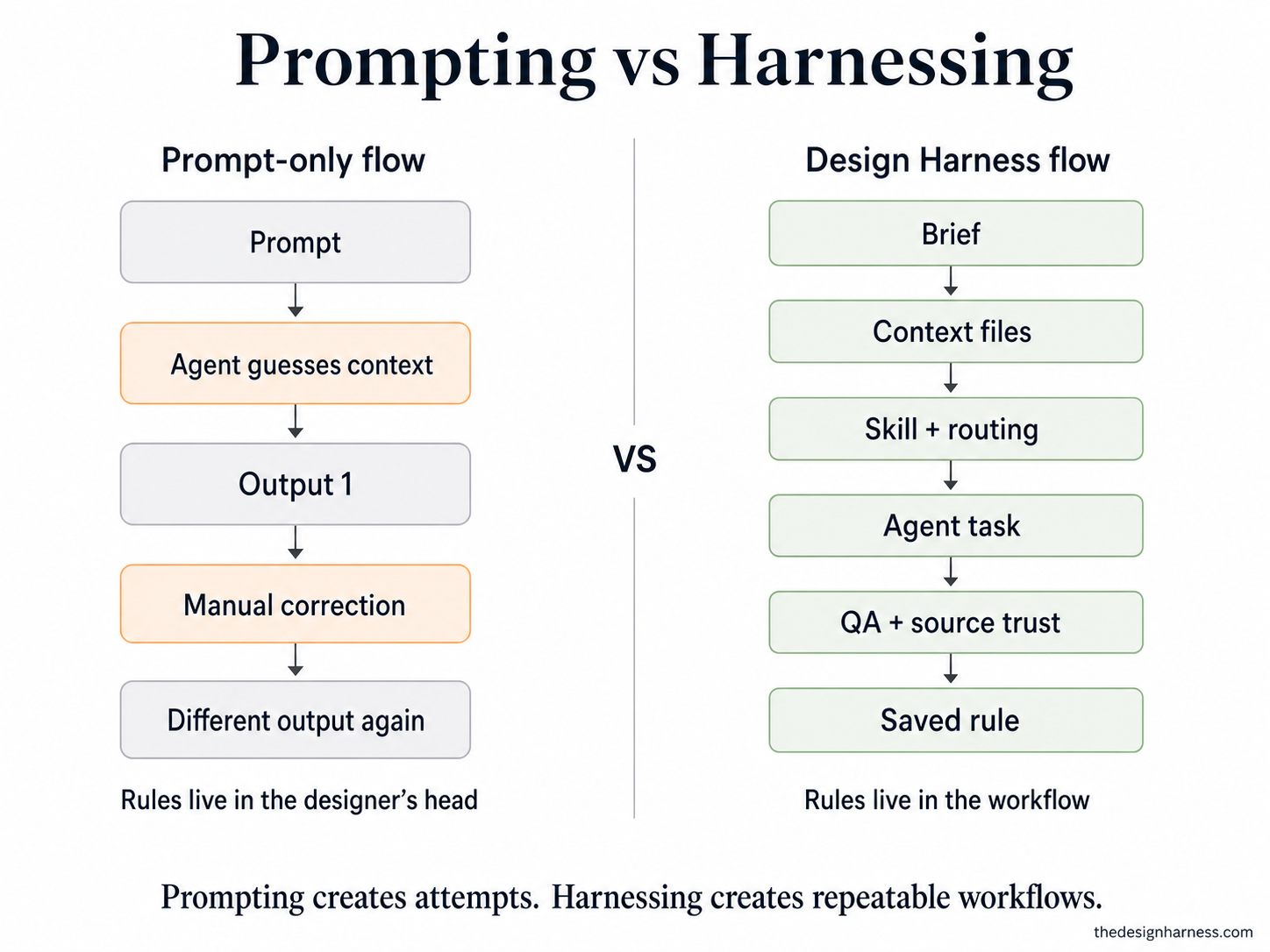
The five-minute version
If you remember only one thing, remember this: the Harness is where the rules live when the designer is not manually re-explaining them.
Start with a brief, not a prompt
A prompt asks for output. A brief frames the work: goal, audience, constraints, source material, open questions, and the decisions the agent should not make alone.
Load context before output
The agent needs product memory, design-system rules, examples, sources, and project history before it can make useful choices.
Use gates, not hope
The work needs checks: sources before claims, screenshots before approval, logs before fixes, design rules before layout, and a human review when judgment matters.
Separate the stable from the temporary
The Harness holds stable rules. A task brief holds the current change. If those get mixed together, every project starts to feel like a new negotiation.
Save the mistake
When the agent fails, the artifact is not the only thing to fix. The rule, checklist, source, routing row, or skill should get better too.
What the Design Harness is
The Design harness is the working system around an AI agent.
It is not one magic prompt. It is the folder of rules, sources, skills, logs, approval gates, design-system checks, and review habits that tells the agent how to work inside a real product.
In the generic Design Harness repo, that system is portable. The company pack can be fictional or replaced with your own. The design system can be the example tokens or your real tokens. The workflows stay the same.
That portability matters. The goal is not to build a Booksy-only tool, or a Planark-only habit. The goal is a designer-owned way of working that can move between products, agents, and teams.
The real flow
A useful harness changes the path of the work.
A vague ask should not jump straight into pixels. A net-new design request needs sources, a brief, and a human gate before the agent starts making. An iteration can move faster, but it still needs routing, a plan, execution, and an audit before it gets shared.
This is the part the current page was missing. The Harness is not a concept. It is a sequence.
Intake
The agent checks what kind of work this is: a new request, an existing project, a critique, a build, a research task, a handoff, or a publish step.
Source sweep
For new work, the agent looks for the material that already exists: product notes, tickets, research, design-system docs, Slack decisions, Figma references, and project history.
Brief gate
The agent drafts the brief from evidence and stops. The designer approves it or sends it back. This is where the work gets its spine.
Skill chain
The request routes to the right playbooks: research, UI, design-system, content, accessibility, critique, deck, ticket, or publish. One task may need several skills.
Audit before share
The build does not count because it exists. It counts after the audit checks design-system rules, accessibility, source trust, copy, screenshots, and known blockers.
Working rule: everything left of a human gate can move fast. Nothing crosses the gate without the designer.
Choose your path
You do not have to learn the whole system in one sitting. Pick the door that matches the work in front of you.
I want the idea
Read the problem, the definition, and the five jobs of a harness. The point is simple: the agent can produce the artifact, but the designer owns the conditions around the artifact.
I want to try it today
Skip the full setup. Pick one repeated workflow, write the missing context, run the task, audit the result, and save one rule from the failure.
I want the reusable system
Use the repo pieces: loaders, orchestrator, context folders, skills, project logs, and QA checks. This is where the workflow stops living only in your head.
What lives in the repo
The repo is the product shape of the Harness. This is where the idea stops being philosophy.
- AGENTS.md / CLAUDE.md thin loaders
-
harness/
- ORCHESTRATOR.md routing, gates, hard rules
- skills/ reusable design workflows
-
context/
- org-pack/ company, voice, patterns, sources
- design-system/ tokens, components, design rules
- projects/ brief, sources, findings, decisions, logs
-
scripts/
- design-detector/ mechanical token and style checks
harness/ORCHESTRATOR.md
The source of truth. It decides how requests are routed, where the human gates sit, which skills run, and which design rules cannot be skipped.
context/
The company and design-system memory: business model, voice, patterns, sources, squads, tokens, components, and visual rules. The generic repo ships with a fictional pack so the workflow works before a real company plugs in its own facts.
harness/skills/
The reusable playbooks. A skill is not a prompt; it names inputs, process, outputs, checks, and the moment where the designer should decide.
projects/
The running memory for each design request: brief.md, sources.md, findings.md, decisions.md, log.md, screens, artifacts, and QA evidence.
Hooks and checks
Cursor rules, onboarding checks, skill nudges, and the design detector create a mechanical layer. They make the good path easier and some bad paths harder.
Quick reference
These are the pieces I would explain first to a designer opening the Harness repo for the first time.
| Artifact | Where it lives | Why it exists |
|---|---|---|
AGENTS.md / CLAUDE.md | Repo root | The entry file that points the agent to the real operating rules. |
ORCHESTRATOR.md | harness/ | The routing layer: what to load, which skill to use, when to stop, and when to ask. |
context/ | Repo folder | Product memory: company, design system, sources, voice, constraints, and examples. |
skills/ | harness/ | Repeatable workflows with inputs, steps, outputs, checks, and human gates. |
projects/ | Per request | The running record: brief, sources, findings, decisions, logs, artifacts, and QA proof. |
| QA checklist | docs/ or harness/ | The proof layer before the work becomes shareable. |
Where the proof comes from
I do not want this site to teach a fantasy workflow. The proof has to come from places where the system was uncomfortable enough to matter.
| Proof environment | What it proves |
|---|---|
| Generic Design Harness | The system can be packaged: org pack, design-system context, orchestrator, skills, project folders, hooks, checks, and public how-to docs. |
| Booksy design-system lab | The workflow survives real design-ops pressure: routing, research, approved briefs, token-first prototypes, critique isolation, audit gates, and team artifacts. |
| Planark | The designer-builder loop survives product pressure: real data, source trust, trip logic, loading behavior, localization, UI judgment, and shipping decisions. |
| This hub | The lessons become public foundations, workflow guides, reference pages, email lessons, and future downloadable artifacts. |
Booksy should not become the product page. It should be the proof. Planark should not carry the whole argument alone. It should show what happens when the designer also owns the product and the code.
The generic repo is the thing we package. The proof environments are how we know it is not empty.
The five jobs of a harness
Harness engineering gives useful language here. The model supplies intelligence. The harness turns that intelligence into reliable work.
For designers, that reliability is not only uptime or tool calls. It is product context, taste, design-system truth, critique, source trust, accessibility, screenshots, and human review.
| Verb | Designer-owned version |
|---|---|
| Constrain | Use design-system rules, token gates, banned moves, permissions, and approval boundaries. |
| Inform | Load product context, company memory, sources, design rules, examples, and project history. |
| Verify | Run critique, accessibility, screenshot, source-trust, token, and audit checks before the work counts. |
| Correct | Turn failures into routing updates, checklist changes, skill edits, and known-issue records. |
| Escalate | Ask the designer when the decision depends on taste, risk, ambiguity, politics, or product judgment. |
The useful sentence: a prompt asks. A harness constrains, informs, verifies, corrects, and escalates.
What this looked like in real work
The abstract version is easy to agree with. The useful version has to survive actual product work.
Planark: source trust before AI output
Planark made the trust problem obvious. A generated travel plan could sound good and still waste someone's day. The product needed real travel sources first: guide structure, coordinates, place identity, distance, images, weather, and a clear line between known and guessed.
AI became useful after that. It could rank, group, summarize, and explain. But it could not be the source of truth. In the Harness, that becomes a rule: sources before claims.
Planark: logs before fixes
Some Planark bugs looked obvious from the surface. A missing image looked like an image bug. A slow trip looked like a model problem. A complete itinerary could still feel wrong.
The better move was to trace the path before changing the code: where did the data come from, where did it change shape, what did the logs prove, and what stayed unverified? In the Harness, that becomes another rule: evidence before correction.
Booksy lab: design ops under pressure
The Booksy design-system lab proved the team-work version. A vague design ask could not jump straight into UI. It needed research, an approved brief, token-first prototype work, critique isolation, and an audit gate before anything became shareable.
That is the portable part: the company changes, the design system changes, the agent changes, but the workflow can stay intact.
Start with one loop
Do not start by building the full Design Harness.
Start with one repeated workflow that already wastes your time.
Pick the painful repeat
Screen critique. Brief to prototype. Source-trust check. Copy audit. Stakeholder handoff. Something you already explain again and again.
Write the missing context
Product goal, audience, tone, design rules, source files, constraints, examples, and the decisions the agent should not make alone.
Turn it into a skill
Make the workflow repeatable: inputs, steps, output format, checks, and the human gate. This is where a useful prompt becomes an operating habit.
Verify the result
Use the proof that matches the work: screenshot review, source check, accessibility pass, token check, log review, or a human critique.
Save the mistake
When the agent fails, do not only fix the artifact. Fix the Harness: update the rule, source, checklist, routing row, known issue, or skill.
Read next
Keep going with one focused piece, not the whole library at once.